
PlatformB2 template

The AI studio for course production and readiness proof

MeVn.ai turns source material into structured courses, rich practice, video and voice assets, multilingual versions, exportable packages, and readiness evidence. It is built for teams that need to know whether people can perform real tasks, not just finish content.

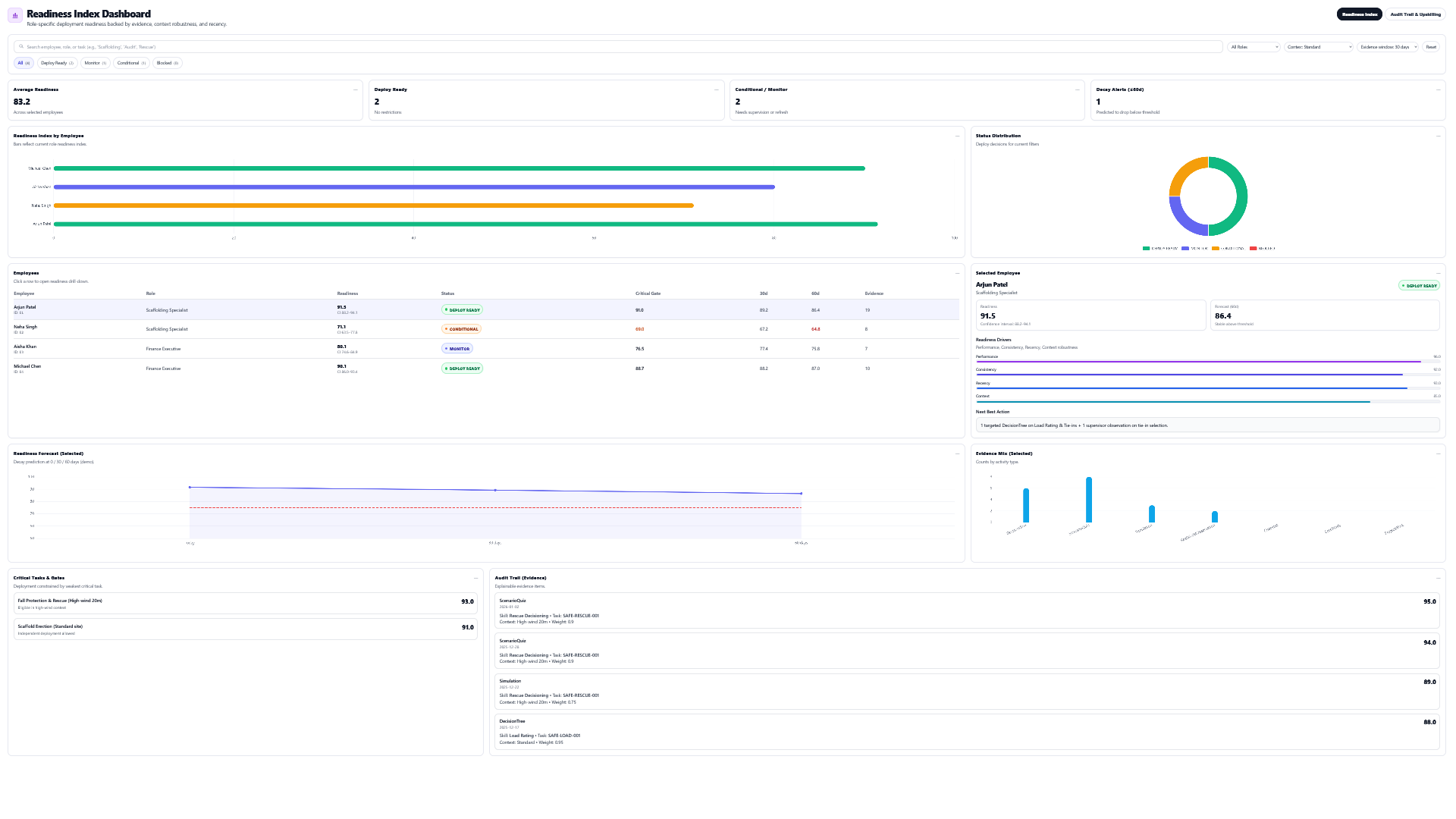
MeVn.ai product view
Readiness dashboard showing employee readiness scores and deployment status.
See who is ready, who needs monitoring, and who needs support.
Deep dive

What buyers need to understand

The short page summary is only the starting point. These sections explain the real platform depth in plain language.

End-to-end pipeline

From source material to deployment decision

Most authoring tools stop when a lesson is published. MeVn.ai keeps the whole chain connected. The same source material that creates the course can also create practice, media, translation, evidence, and readiness reports.

Source

Bring the work knowledge teams already use.

  • SOPs and policies
  • Videos and process recordings
  • PDFs, URLs, notes, audio, images

Author

Let AI structure the course before it writes content.

  • Modules and topics
  • PLOs, LOs, terminology
  • Prompt previews and incremental topic generation

Practice

Pick activity types that match the skill.

  • Recall, application, judgment
  • Role-play, simulation, decision paths
  • Checklists and scenario evidence

Prove

Turn practice into a readiness signal.

  • Performance
  • Consistency
  • Recency
  • Context
Why it matters

This is not a faster slide builder

The disruptive part is not simply that the AI writes lessons. The disruptive part is that MeVn.ai connects authoring, practice, media, language, export, and readiness evidence in one workflow. That lets a team produce a course and also answer the question leaders actually care about: who is ready to perform the task?

  • Instructional designers can produce deeper programs faster.
  • SMEs can provide source knowledge without hand-building every activity.
  • Managers can see readiness risk instead of waiting for mistakes.
  • Global teams can reuse the same course logic across languages.
Feature depth

The Studio is a system of connected capabilities

Each capability deserves its own page because buyers need to understand the depth: source upload, course planning, activity generation, video-to-clips, media strategy, voiceover, translation, SCORM export, evidence capture, and readiness dashboards are all separate stories that reinforce one another.

Buyer proof

One studio connects course creation, practice evidence, and readiness decisions.

Buyers do not need another content repository. They need proof that people can perform important tasks.

Book demo

Create

Turn source content into structured lessons and media.

Practice

Use 12 activity types that reveal what people can do.

Measure

Score performance, consistency, recency, and context.

Improve

Recommend practice and support before risk grows.

What it does

A simple way to understand the capability

The Studio covers the full course creation cycle: collect source knowledge, plan the course, generate content, choose practice activities, produce video and voice, translate the course, export the output, and feed readiness evidence into the Workforce Readiness Index.

Start from real work

Use SOPs, PDFs, videos, URLs, text, audio, images, or a plain prompt as the source of truth.

Plan the course

Generate course plans, modules, topics, terminology, program outcomes, and lesson outcomes.

Build rich practice

Create quizzes, flashcards, worksheets, role-plays, simulations, checklists, games, case studies, projects, reflections, and decision paths.

Produce media

Create scripts, voice-over, subtitles, infographics, process clips, 3D objects, and video production workflows.

Localize the program

Clone courses into target languages with translation job tracking, language detection, and RTL support.

Prove readiness

Convert practice into evidence for performance, consistency, recency, context, audit trails, and readiness tiers.

How it works

A simple path from source to readiness

The workflow stays clear for buyers, authors, reviewers, and leaders.

Step 1

Source

Start with a prompt, SOP, video, PDF, or expert note.

Step 2

Practice

Choose activities that match the skill.

Step 3

Evidence

Capture proof from the work people do.

Step 4

Action

Use readiness gaps to guide support.

Capabilities

What this gives your team

Start with a task, SOP, topic, or document. Build lessons and practice that feed the Readiness Index.

Source intelligence

  • Upload videos, documents, audio, and images.
  • Register URLs or paste expert text.
  • Track upload state, analysis state, size, and cost.
  • Link source material to course plans and jobs.

Course planning

  • Generate course plans with modules and topics.
  • Create terminology lists for domain consistency.
  • Generate PLOs and course-level learning outcomes.
  • Preview prompts before running generation.

Content production

  • Build prompts for selected activity types.
  • Run async AI generation with progress events.
  • Save, delete, or manually edit content.
  • Check whether content already exists before regenerating.

Readiness production

  • Map activities to evidence patterns.
  • Capture performance data from practice.
  • Apply context-aware evidence weighting.
  • Feed the Workforce Readiness Index and audit trail.
Readiness evidence

Readable proof for real decisions

MeVn.ai connects practice activity, evidence, audit trail, and readiness scoring. Leaders can see who is ready, who needs monitoring, and where practice should happen next.

Ready Monitor Needs support
MeVn.ai product view
Readiness dashboard showing employee readiness scores and deployment status.
See who is ready, who needs monitoring, and who needs support.
Common questions

Simple answers for buyers

Plain-language answers about how MeVn.ai turns training into readiness proof.

What is the Readiness Authoring Studio?

It is the main MeVn.ai workspace for creating course plans, lessons, practice activities, media, multilingual versions, exports, and readiness evidence from source material.

What can I use as source material?

Teams can start from prompts, SOPs, PDFs, videos, URLs, text notes, audio, images, or expert input.

How is this different from a normal authoring tool?

A normal authoring tool creates content. MeVn.ai creates content plus practice evidence, readiness scoring, audit trails, and multilingual production workflows.

Does it replace instructional designers?

No. It gives instructional designers and SMEs a production engine so they can design richer programs faster and spend more time on judgment, review, and quality.

Explore next

Useful next steps for understanding the platform, readiness score, and production workflow.

See how readiness authoring works with your content.

Bring one SOP, policy, video, or training challenge. MeVn.ai can show how it becomes lessons, practice, evidence, and readiness insight.